AI for Design Studios: Let the Agent Draft, You Finish

It's 4:40 on a Thursday. A restaurant client emails: the summer menu starts Monday, they need a feed post, a story, a printed table card, and "can you also change the sea bass price to €21 on last week's flyer?" None of that is creative work. All of it lands on a designer.
That's the part of studio life AI for design studios should take over. Not the concept, not the taste, not the final call. The production pile.
I think the right model is the one developers already use with coding agents. The agent writes a first version in seconds. The developer reads it, throws away the bad parts, fixes the rest, and ships. Nobody expects the agent's first pass to be perfect. They expect it to be fast, editable and easy to take over.
Design works the same way. Here's what that looks like in practice, including where it stops.
The draft is not the deliverable
Below are three drafts Ridvay made from the same one-paragraph brief for a fictional seafood restaurant, Harbour Grill. I didn't touch them. This is what came back, about 20 seconds each:
Summer menu launch post for Harbour Grill, a seafood restaurant by the harbour. Headline: "Summer on the Harbour". Three new dishes with prices: Grilled sea bass €19, Crab linguine €17, Lemon tart €7. Line: "New menu from 1 June". Fresh, bright, coastal mood.
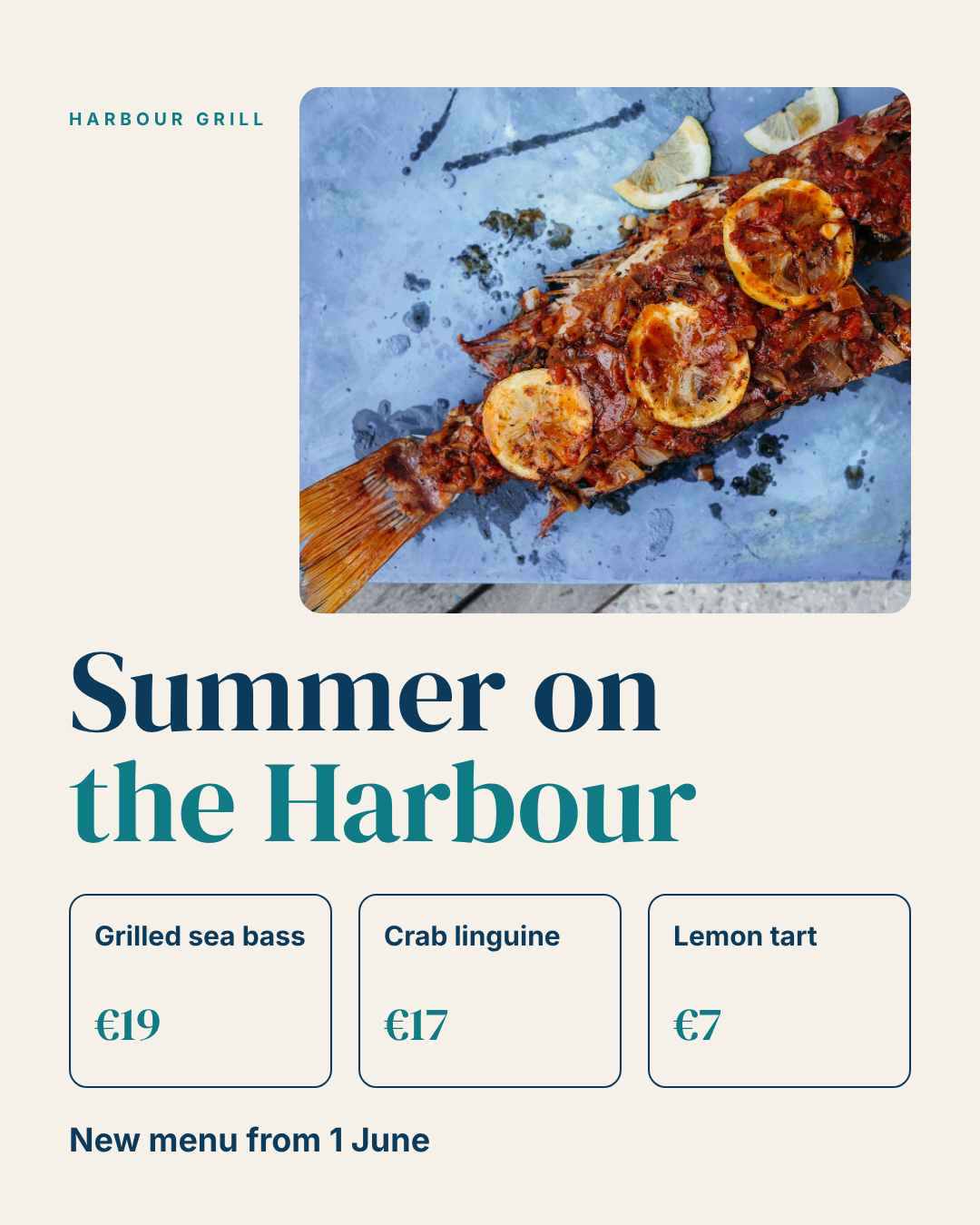
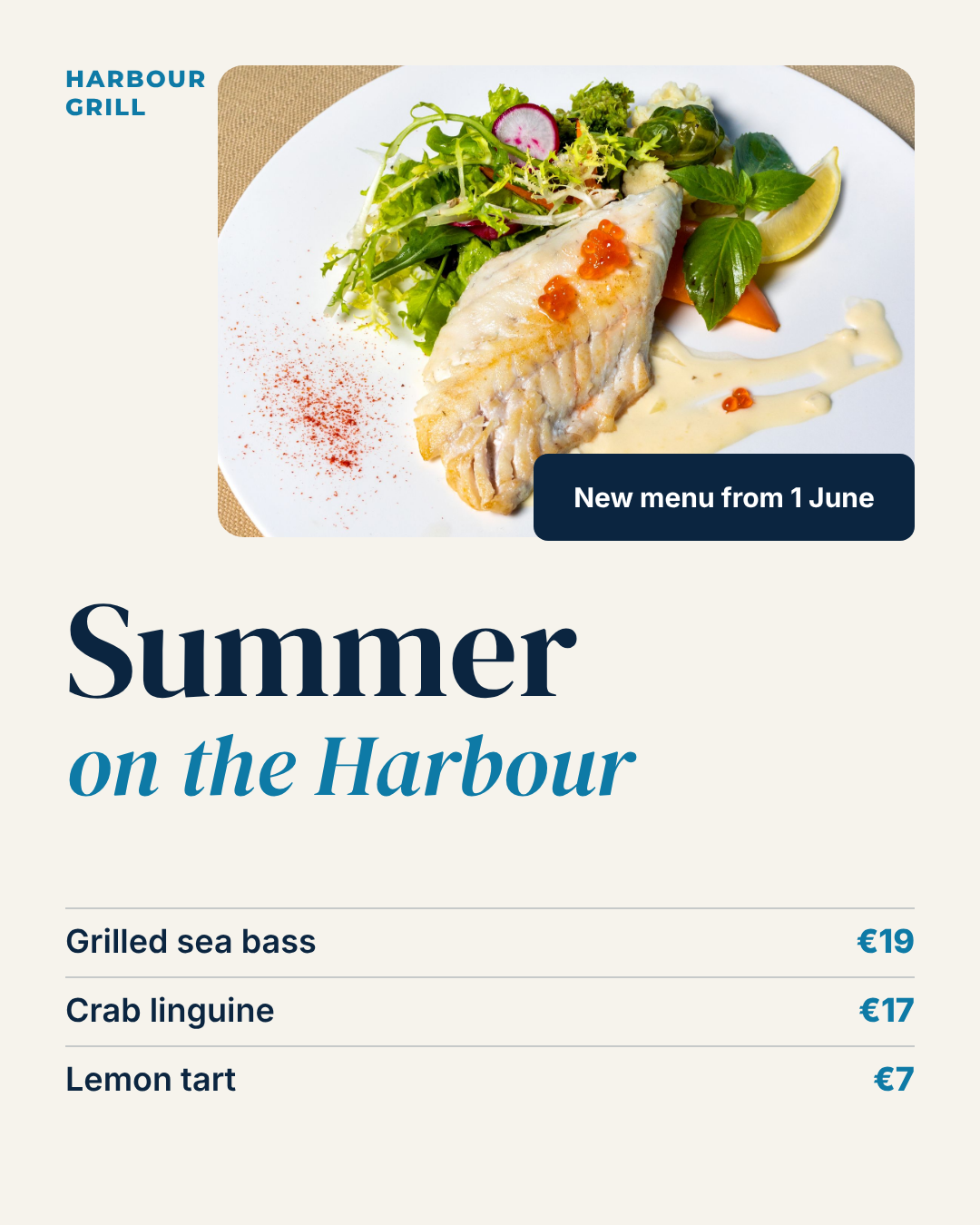
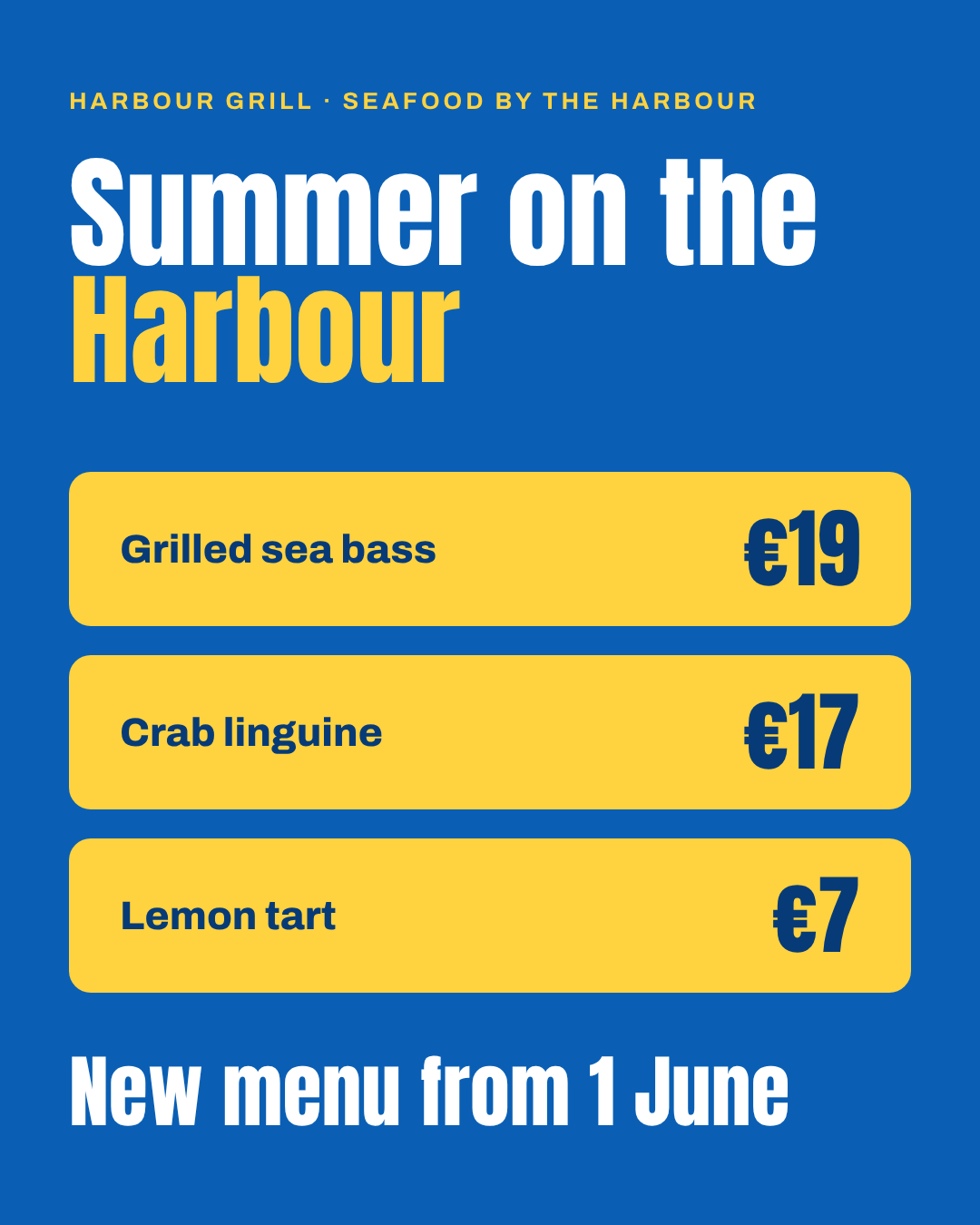
Three real directions: an editorial serif with a hero photo, a calmer menu-card layout, and a loud price-led poster. Every price and line from the brief is there, spelled right.
And a designer would still change things in every one of them:
- Draft 1: the photo is pushed right, leaving a dead strip on the left under the restaurant name. The price cards are the same weight as each other, so nothing leads.
- Draft 2: the bottom third is empty. Either the list grows or the headline does.
- Draft 3: strong for a story, but it has no food in it. A seafood launch without a plate of seafood is a missed sale.
That's the honest picture. The agent got you from a blank page to three defensible directions faster than you could open your file browser. It did not finish the job. You do.
Example: one draft, finished
Here's draft 1 again, next to the same design after the fixes above, made in the editor on the layers the AI produced:

What changed:
- The photo went full width. The dead strip on the left is gone, and the fish now fills the top of the post.
- One dish leads. The sea bass is the launch, so it's set large in the headline serif. The linguine and the tart drop to a quiet list underneath.
- The date became a tag on the photo, where people look first, instead of a line lost at the bottom.
- Nothing new was added. Same photo, same fonts, same colours, same words. Only the hierarchy and the spacing changed.
That's the split in one picture: the agent supplied the content, the type and the colour; the designer decided what matters. Open the finished version as an editable copy to see every layer, or compare it with the original draft.
What the agent is good at, and what stays yours
| The agent handles | You keep |
|---|---|
| Three or four directions from one brief | Choosing the one that fits the client |
| Getting every price, date and line onto the page | Hierarchy: what leads, what whispers |
| Re-laying out the chosen design at other sizes | Photo choice and crop |
| Applying a client's brand colours and fonts | The details that make it look expensive |
| Small text and price changes, again and again | Saying no to the client's fourth logo |
If you've read how designers make money in 2026, you know where the hours go. Most of them sit in the left column.
A week at a small studio, with an agent
Here's how I'd set up a three-person studio with a dozen local clients. The studio and client names are made up; the features are all real and live today.
Monday: brief to directions. Paste the client's brief into Studio and run it a few times. You get different layouts each run, as above. Pick one and kill the others in the client call, not in your own head at 11pm.
Monday afternoon: finish it yourself. Everything in a Ridvay design is a separate, editable layer: the headline is text, the price cards are shapes, the photo is a photo. Fix the hierarchy, swap the image, tighten the spacing. This is where your taste shows, so spend your time here.
Tuesday: lock the brand. Each client gets a brand kit with their colours, fonts and logo. A design remembers which brand it was made with. Turn on strict brand and Ridvay flags anything off-brand, with one click to fix it all. When the client tweaks their palette later, their existing designs offer to update.
Wednesday: hand the boring edits back to the client. Put the client's designs in a team project and invite their manager with the access level called "Text, photos and data only". They can change prices, dates and photos. They can't move, resize or restyle anything, and the server enforces that, not just the interface. The €21 sea bass email stops being your problem.
Thursday: approvals. Turn approvals on for the team. A design goes to a named reviewer before it's final. When the team requires approval, downloads and share links serve the approved version, even if someone edits the design afterwards.
Friday: every output. Export PNG or JPG for social, PDF for print, PowerPoint for the client who lives in slides, MP4 or GIF if the design is animated. Or skip the export: every design has a live image link that always shows the current version, so the menu on the client's website updates when they change a price.
Driving it from your own agent
If your studio already works in Claude or ChatGPT, you don't have to open Studio to get a first draft. Connect the Ridvay app and ask in the chat: "make three versions of the Harbour Grill summer post, portrait, coastal". The designs land in your account as normal, editable Ridvay designs, ready for you to finish. That's the coding-agent workflow almost word for word: the agent writes, you review in a proper editor.
Where it stops (read this before you pitch it to a client)
I'd rather you hear the limits from us than find them on a deadline.
- No Figma or Illustrator import yet. Ridvay exports PNG, JPG, PDF, PowerPoint, GIF and MP4. If your finishing happens in Figma, you'd bring a flat image across, not layers. For now the finish happens in Ridvay's editor.
- Translations are for personal designs only. Making a design in Spanish, German or Japanese from one original works (see franchise posts in every language), but not yet inside a team project.
- Drafts are drafts. On short, vague briefs the agent guesses. On a brief like the one above, with real copy and a mood, it guesses far less. Write briefs the way you'd brief a junior.
- It won't replace a brand identity project. It works inside a brand. It doesn't invent one worth a client's money.
Building your first studio draft in Ridvay
Try it on a real client job, not a test. Paste this, swapping in your client's details:
A launch post for [client], a [type of business]. Headline: "[headline]". Include: [the exact lines, prices and dates]. Mood: [two or three words]. Portrait, 1080×1350.
Then, before you show anyone:
- Fix the hierarchy. Click the element that should lead and drag its size up until it clearly wins. Make the second most important thing obviously second.
- Replace the photo with the client's own shot, and crop it so the food (or product) fills the frame.
- Apply the client's brand kit and turn on strict brand. Hit "Fix all" if anything is flagged.
- Make the story version with Resize in the design menu: pick 1080×1920 and the AI re-lays out the whole design at the new size. Then check the type still breathes.
Draft a client post in Ridvay Studio →
The studio that wins with AI
The studios I'd bet on aren't the ones that hide AI from clients or the ones that sell raw AI output as design. They're the ones that let an agent do the first 70% in minutes, put their hours into the last 30%, and hand clients a safe way to change their own prices.
Your taste is the product. The production pile never was.